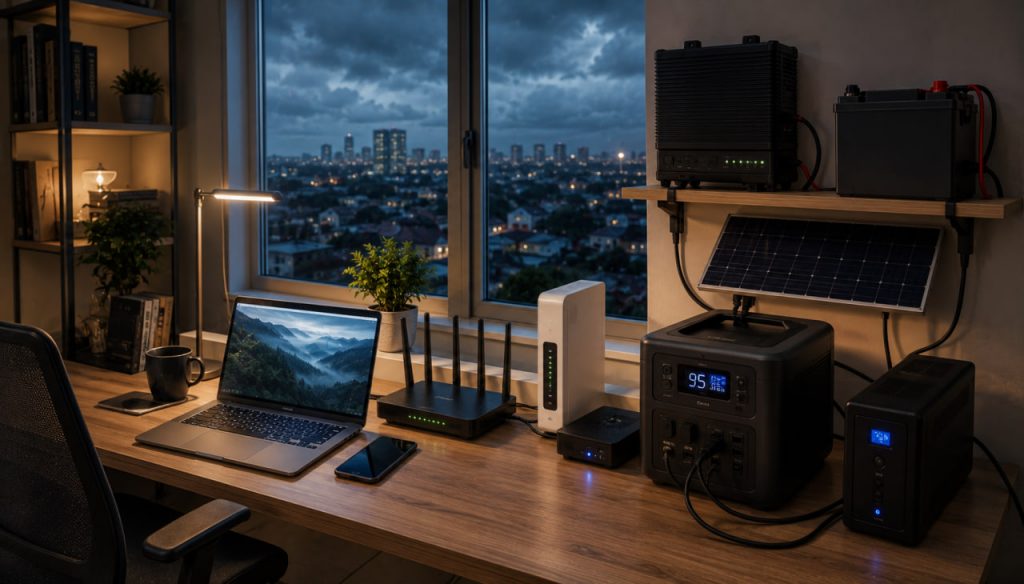
A power outage does not always cause an immediate internet outage. Fiber, cable, fixed wireless, cellular, and satellite connections may continue operating if both the provider’s infrastructure and the equipment inside your home have backup power.
However, keeping only a laptop or smartphone charged is not enough. Your modem, fiber terminal, router, wireless access points, and sometimes external antennas also require electricity. The provider’s local equipment, cellular towers, and network backhaul must remain operational as well.
The most reliable strategy combines backup power for local equipment with at least two independent internet connections that do not depend on the same infrastructure.
Understand Why Internet Service Fails During a Blackout
A typical home internet connection depends on several powered components:
- The provider’s network and local distribution equipment
- A modem, optical network terminal, or fixed-wireless receiver
- A Wi-Fi router
- Network switches or mesh access points
- Computers, phones, and other connected devices
The Federal Communications Commission warns that modern fiber, cable, wireless, and internet-based telephone services may stop working during an electrical outage unless customers have backup batteries, generators, or another safe power source.
Even when your router remains powered, the connection can still fail if the provider’s street cabinet, tower, amplifier, or upstream network loses electricity. CISA has reported that some of the most widespread and prolonged communications disruptions have been caused by power loss.
Identify Every Device That Requires Backup Power
Before purchasing a battery, inspect the complete connection from the provider’s cable to your devices.
A fiber installation may include:
- An optical network terminal
- A separate power supply
- A Wi-Fi router
- A network switch
- Mesh Wi-Fi nodes
A cable or digital subscriber line connection may require:
- A modem
- A router
- A powered signal device
- A telephone adapter
A fixed-wireless connection may also use:
- An outdoor receiver
- A power-over-Ethernet injector
- An indoor router
Place every essential component on backup power. Connecting only the Wi-Fi router will not help if the modem or optical terminal switches off.
Measure the Real Power Consumption
Check the power adapter or technical label on each device. The label usually lists voltage and current.
Approximate maximum power can be calculated as:
Watts = Volts × Amperes
For example, a router rated at 12 volts and 1.5 amperes may require up to 18 watts. A modem using 12 watts and a router using 18 watts create a combined estimated load of 30 watts.
Actual consumption may be lower than the adapter’s maximum rating, so a plug-in energy meter provides a more accurate measurement.
Add approximately 20 to 30 percent of operating margin for conversion losses, startup demand, battery aging, and additional equipment.
Calculate the Required Battery Capacity
Battery capacity is commonly measured in watt-hours.
A simplified runtime estimate is:
Runtime in hours = usable battery capacity in watt-hours ÷ total load in watts
If the networking equipment consumes 30 watts and the backup battery provides 300 usable watt-hours, the theoretical runtime is approximately ten hours.
Real runtime will usually be shorter because of:
- Inverter losses
- Battery-management reserves
- Low temperatures
- Battery aging
- High operating loads
- Inefficient power conversion
For practical planning, avoid assuming that 100 percent of the advertised battery capacity will be available.
Use an Uninterruptible Power Supply for Short Outages
An uninterruptible power supply is usually the simplest solution for interruptions lasting from several minutes to a few hours.
A suitable unit can power:
- A modem or optical terminal
- A Wi-Fi router
- A small network switch
- One mesh access point
- A low-power computer
The main advantage is automatic operation. When grid electricity fails, the UPS switches to battery power without requiring the user to reconnect equipment.
Choose a model with:
- Sufficient watt capacity
- Adequate battery runtime
- Replaceable batteries where possible
- Surge protection
- Automatic voltage regulation
- Clear battery-status indicators
Do not select a UPS only by its volt-ampere rating. Check its maximum watt output and estimated runtime at your actual load.
Consider a Direct-Current Backup System
Many routers, modems, and fiber terminals operate internally on direct current. A conventional UPS converts battery power into alternating current, after which each device’s adapter converts it back into direct current.
This double conversion wastes energy.
A compatible direct-current UPS can power supported networking equipment more efficiently. Some models provide selectable outputs such as 5, 9, 12, or 24 volts.
Before connecting one, verify:
- Exact voltage
- Required current
- Connector dimensions
- Connector polarity
- Device compatibility
- Overcurrent protection
Using the wrong voltage or polarity can permanently damage networking equipment.
Never assume that two connectors are compatible merely because they fit physically.
Use a Portable Power Station for Longer Blackouts
A portable power station can support networking equipment for much longer than a small desktop UPS.
It may provide:
- Alternating-current outlets
- USB power
- Regulated direct-current outputs
- Solar charging input
- Battery monitoring
- Higher capacity than a standard UPS
For the best runtime, power low-voltage networking devices directly from compatible direct-current outputs where possible. Using an inverter for a small router may consume unnecessary energy.
Some power stations include an automatic backup mode, but transfer times and operating behavior differ. Confirm that your modem and router remain connected when the power source changes.
Keep the Battery Charged and Test It Regularly
Backup equipment is useful only when it is ready.
At least several times per year:
- Disconnect grid power.
- Confirm that every required network device remains active.
- Check whether the internet connection continues working.
- Measure actual runtime.
- Inspect batteries and cables.
- Confirm that the system recharges correctly.
Battery capacity declines with age. Heat, deep discharge cycles, and poor storage conditions can accelerate deterioration.
Replace damaged, swollen, leaking, or overheating batteries immediately according to the manufacturer’s instructions.
Add Solar Power for Extended Outages
Solar panels can extend battery runtime during long disruptions, but they should normally charge a battery rather than power networking equipment directly.
A resilient setup may include:
- Solar panels
- A solar charge controller
- Battery storage
- A suitable inverter or regulated direct-current output
- Protected cables and connectors
- Backup networking equipment
Solar output changes with weather, season, shade, panel orientation, and daylight hours. The system should generate enough energy to operate the network while also restoring battery capacity.
Design the system around poor-weather production rather than ideal midday output.
A grid-connected solar installation may shut down automatically during a blackout unless it includes supported backup operation, isolation equipment, and energy storage.
Use a Generator Safely for Prolonged Emergencies
A generator can recharge batteries and power communications equipment during an extended outage. It is generally more efficient to run the generator periodically at a useful load to recharge a battery system than to operate it continuously for a small router.
Portable generators produce dangerous carbon monoxide. Ready.gov states that generators should be used outdoors and kept away from windows, doors, and vents.
Never operate a generator:
- Inside a home
- Inside a garage
- In a basement
- On an enclosed balcony
- Near an open window
- In an area where exhaust can enter a building
Use carbon-monoxide alarms with battery backup and follow the generator manufacturer’s grounding, ventilation, fuel-storage, and weather-protection requirements.
Maintain a Cellular Backup Connection
A smartphone hotspot or dedicated cellular router can provide internet access when the fixed connection fails.
A dedicated cellular router is generally more practical for repeated outages because it can offer:
- External antenna support
- Ethernet ports
- Automatic failover
- Better thermal management
- Permanent power connections
- Multiple subscriber identity module slots
Choose a mobile provider that does not share all of the same local infrastructure as your primary connection.
During widespread outages, cellular service may become slower because:
- Towers lose grid power
- Backup batteries become depleted
- Generator fuel runs low
- Backhaul connections fail
- Large numbers of users move to mobile data
For this reason, cellular internet should be treated as an independent backup, not a guaranteed replacement under every emergency condition.
Use More Than One Mobile Network
Two mobile plans from different brands may still depend on the same towers, roaming partners, or backhaul.
For stronger redundancy, investigate whether the networks use:
- Different physical operators
- Different tower locations
- Different frequency bands
- Different regional backhaul
- Separate billing and authentication systems
A dual-subscriber-identity-module router can automatically switch networks when one service becomes unavailable.
Test both connections under normal conditions and during smaller outages before depending on them in an emergency.
Consider Satellite Internet
Satellite internet can remain available when local cable, fiber, or cellular infrastructure is damaged, provided that:
- The satellite service remains operational
- The terminal has backup power
- The antenna has a clear view of the sky
- Severe weather does not prevent reliable operation
- The subscription is active
Power consumption is an important consideration. Starlink states that its current Standard equipment typically consumes approximately 75 to 100 watts, while Starlink Mini generally averages about 25 to 40 watts. Actual consumption varies with model, operating conditions, and features.
A 100-watt satellite system can consume substantially more energy than a conventional fiber terminal and Wi-Fi router. Battery capacity must therefore be sized accordingly.
Starlink also offers direct-current power options for certain equipment in supported markets, which can reduce the need for an inverter.
Combine Fixed, Cellular, and Satellite Connections
The strongest household or small-business configuration uses connections with different failure modes.
A resilient setup might include:
- Fiber or cable as the primary service
- Cellular data as the first backup
- Satellite internet as the emergency backup
- A UPS for instant power continuity
- A larger battery for extended operation
- Solar panels or a generator for recharging
This design protects against several different problems:
- Local router failure
- Provider outage
- Fiber cut
- Cellular congestion
- Regional infrastructure damage
- Long-duration electricity loss
True resilience comes from diversity, not merely from purchasing two connections that depend on the same network.
Configure Automatic Internet Failover
A dual-WAN or multi-WAN router can monitor the primary connection and switch to a backup service automatically.
Possible configurations include:
- Fiber plus cellular
- Cable plus cellular
- Fiber plus satellite
- Fixed wireless plus mobile data
- Two independent wired providers
Automatic failover is useful for remote work, security systems, online businesses, and communications equipment.
Some routers can also combine connections or distribute traffic across them. However, load balancing does not always make a single video call faster, and session continuity may depend on the router, application, and network design.
Test whether active calls, virtual private network connections, and business applications recover correctly after failover.
Prioritize Essential Internet Traffic
Backup connections may have lower speeds, limited data allowances, or higher energy consumption.
During an outage, prioritize:
- Emergency alerts
- Voice and video communication
- Work-related services
- Banking and essential payments
- Security monitoring
- Medical communications
- Weather information
Temporarily restrict:
- High-resolution streaming
- Large software updates
- Cloud backups
- Online gaming downloads
- Automatic media synchronization
- Nonessential connected devices
Quality-of-service controls can reserve bandwidth for critical applications.
Reduce the Number of Powered Devices
Every additional device shortens battery runtime.
During a prolonged outage:
- Disable unused mesh nodes
- Turn off guest Wi-Fi
- Disconnect entertainment systems
- Shut down network storage when it is not required
- Disable decorative lighting
- Use one efficient laptop instead of a desktop computer
- Charge mobile devices only when necessary
A high-performance desktop computer can consume far more electricity than the networking equipment itself. For remote work, an efficient laptop significantly extends the useful life of the backup system.
Prepare for Communication Without Internet
No system can guarantee continuous internet access during a severe regional emergency.
Ready.gov recommends maintaining a communications plan, keeping alternative charging methods for phones, and preserving important information in accessible form.
Prepare offline access to:
- Emergency telephone numbers
- Family contact information
- Medical information
- Local maps
- Insurance documents
- Utility account details
- Provider support numbers
- Identification documents
- Radio frequencies and emergency channels
Keep a battery-powered or hand-crank radio for official alerts when internet and mobile services are unavailable.
Secure Backup Networks
Emergency connections should receive the same security attention as the primary network.
Use:
- Strong unique passwords
- Current router firmware
- Modern wireless encryption
- Multifactor authentication
- Encrypted virtual private networks when appropriate
- Separate guest access
- Disabled remote administration unless required
Avoid connecting critical work devices to unknown public wireless networks without appropriate security precautions.
Store backup router configurations offline so the network can be restored after hardware failure or reset.
Build a Small-Business Continuity Plan
Businesses should identify which operations must remain online during an outage.
The plan should define:
- Maximum acceptable downtime
- Required internet speed
- Essential employees and devices
- Backup power duration
- Alternative work locations
- Cloud-service dependencies
- Customer communication procedures
- Recovery responsibilities
- Testing schedules
Ready.gov advises businesses to include communications planning, information-technology support, recovery procedures, and operational continuity in their emergency plans.
A business that cannot tolerate downtime should consider enterprise cellular service, multiple wired providers, satellite backup, automatic failover, and professionally designed power resilience.
Expert Perspective: Power Resilience Is Communications Resilience
CISA’s guidance on resilient power states that loss of electricity has caused some of the most widespread and long-lasting communications outages. The agency recommends layered planning, diverse backup capabilities, regular testing, fuel management, and an understanding of dependencies between power and communications systems.
The practical conclusion is clear: stable internet during a blackout cannot be achieved through connectivity planning alone. Communications resilience must be designed together with power resilience.
A Practical Home Setup
For a household that needs reliable connectivity for remote work, a balanced system could include:
- A primary fiber or cable connection
- A modem and router connected to a UPS
- A larger portable battery for extended runtime
- A dedicated cellular router from another provider
- A dual-WAN router with automatic failover
- Offline maps and emergency contacts
- Periodic system testing
For locations with frequent multi-day outages, add:
- Solar charging
- A safely operated generator
- Satellite internet
- Larger battery storage
- External cellular antennas
The exact design should reflect local hazards, outage duration, available providers, budget, climate, and the importance of continuous connectivity.
Conclusion
Maintaining stable internet during regional power interruptions requires more than charging a phone or connecting a router to a small battery. The complete system must include powered customer equipment, functioning provider infrastructure, adequate battery capacity, and an alternative connection when the primary network fails.
Start by measuring the electricity used by the modem, fiber terminal, router, and access points. Use a UPS for immediate continuity and a larger battery system for longer outages. Add cellular or satellite service that does not depend on the same local infrastructure, and configure automatic failover where uninterrupted access is important.
The most dependable solution is a layered system: efficient networking equipment, tested backup power, at least two genuinely independent internet paths, and an offline communication plan for situations in which every network becomes unavailable.